Color, typography and motion: audiovisual design principles

Audiovisual design is graphic design plus time
A static poster is finished in one moment.
A video is 24 posters per second.
So graphic design rules apply, but with an extra dimension: movement through time.
Colors in video (different from print)
In print: color is fixed. It stays where you put it.
In video: color moves, changes, disappears.
Rule 1: Limit the palette 3–4 main colors. Any color outside them becomes a highlight and draws the eye.
Rule 2: Consider the background A color that looks beautiful on white might disappear on black.
Rule 3: Use color to guide attention When the focus shifts, the color shifts too. It connects scenes visually.
Rule 4: Test on multiple screens The same color looks different on a MacBook and on a TV. Test everywhere.

Typography in motion (not static typography with effects)
Video typography must be:
Legible on small screens If it disappears on a phone, it’s failed.
Respect the hierarchy Large title, medium body, small detail. Never varies.
Have space Tight typography in video looks chaotic.
Serve the emotion Letters that flip in are tiresome. A smooth entry is professional.
Movement in design
Purpose: Every animation should communicate something.
Timing: What lasts 1 second vs. 2 seconds changes meaning.
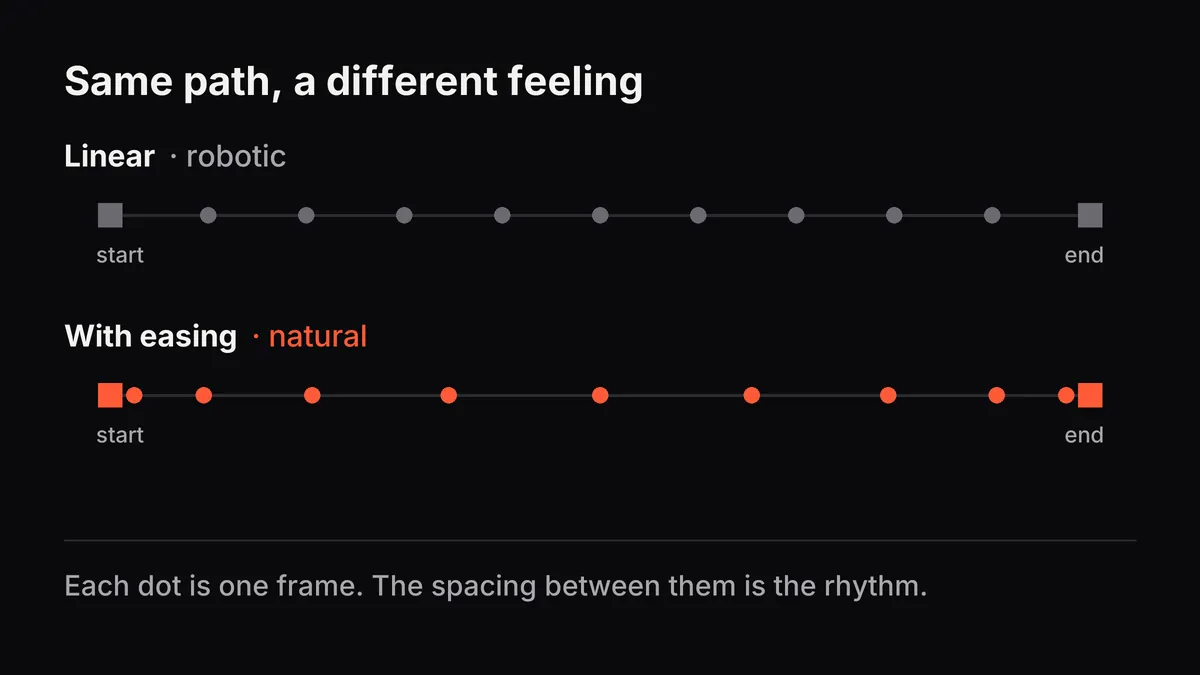
Easing: Linear movement looks robotic. Eased movement feels natural.
Sequence: What moves first? What impact does that have on reading?
One movement at a time
Don’t animate 5 things at once. The eye can’t follow.
In sequence: the 1st moves → the 2nd moves → the 3rd moves. Clean and clear.
Proportion: what’s big vs. small
Size communicates importance.
Big = important. Small = support.
If you want the call to action to be the focus, it has to be the biggest thing on screen.
Application examples
Education: A key phrase changes color, then the supporting details appear one by one.
Sales: The product is big and colorful. Benefits appear small around it. CTA in a contrasting color.
Brand: The logo evolves through colors and shapes. It tells a story visually.
What to avoid
- Type too small for video
- Colors that vibrate against each other (a headache for the viewer)
- Motion that competes with information (motion distracts)
- A color palette that changes every second
Good audiovisual design is invisible. The viewer doesn’t “see” the principles: they just follow the narrative naturally.
The same principles guide a visual identity: see how they show up in the portfolio cases.